Hello all
Today I will try to demonstrate how to create simple web service through WCF. To get into WCF first we have to know some basic principal of WCF and its "ABC".
Address : the location of the service.
Bind: how to get service.
Contract: service action.
In this tutorial I will not describe details about WCF.My basic focus will be on creating a WCF service through Visual Studio 2008
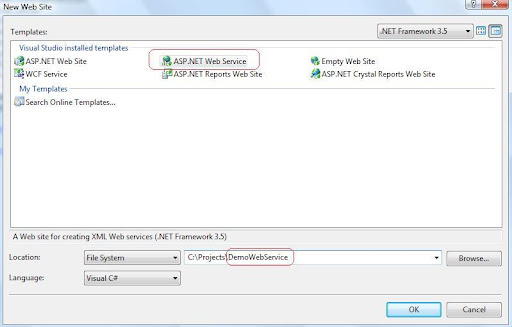
First open a new WCF project:
In my sample project I have named "TestWCFService" for creating the service.
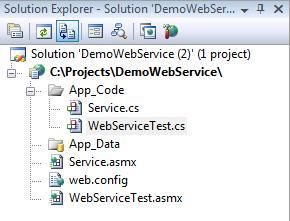
In the solution explorer you will found IService1.cs interface , Service1.svc file and a code behind file Service1.svc.cs
In my project I have renamed those as IDataService.cs, DataService.svc and DataService.svc.cs accordingly. To change the markup file of DataService.svc right click on the DataService.svc file in solution explorer and press "View Markup" as bellow
and change the Service according to you code as bellow.
<%@ ServiceHost Language="C#" Debug="true" Service="TestWCFService.DataService" CodeBehind="DataService.svc.cs" %>
In the solution my IDataSevice.cs is as bellow:
using System.Runtime.Serialization;
using System.ServiceModel;

namespace TestWCFService
{

    [ServiceContract]
    public interface IDataService
    {

        [OperationContract]
        UserInformation GetUserDataFromService();

        [OperationContract]
        string GetUserRestrictionFromService(string userID);

        // TODO: Add your service operations here
    }


    // Use a data contract as illustrated in the sample below to add composite types to service operations.
    [DataContract]
    public class UserInformation
    {

        [DataMember]
        public string UserName { get; set; }

        [DataMember]
        public string UserLocation { get; set; }


        public string UserRestriction(int userID)
        {
            if (userID.Equals(1))
                return "approve";
            else
                return "rejected";
        }

    }
}
My DataService.svc.cs file is as bellow :
using System;

namespace TestWCFService
{
    // NOTE: If you change the class name "Service1" here, you must also update the reference to "Service1" in Web.config and in the associated .svc file.
    public class DataService : IDataService
    {
        #region IDataService Members

        public UserInformation GetUserDataFromService()
        {
            return new UserInformation() { UserName = "Tanvir", UserLocation = "Dhaka" };
        }

        public string GetUserRestrictionFromService(string userID)
        {

            UserInformation userInformation = new UserInformation();

            if (userInformation.UserRestriction(Int32.Parse(userID)).Equals("approve"))
                return String.Format("your user id is {0} and you are approved", userID);
            else
                return String.Format("your user id is {0} and you are not approved", userID);

        }

        #endregion
    }
}
And the most important thing is to change in system.servieModel section in Web.config file as bellow :
<system.serviceModel>
        <services>
            <service name="TestWCFService.DataService" behaviorConfiguration="TestWCFService.Service1Behavior">
                <!-- Service Endpoints -->
                <endpoint address="" binding="wsHttpBinding" contract="TestWCFService.IDataService">
                    <!--
              Upon deployment, the following identity element should be removed or replaced to reflect the
              identity under which the deployed service runs.  If removed, WCF will infer an appropriate identity
              automatically.
          -->
                    <identity>
                        <dns value="localhost"/>
                    </identity>
                </endpoint>
                <endpoint address="mex" binding="mexHttpBinding" contract="IMetadataExchange"/>
            </service>
        </services>
        <behaviors>
            <serviceBehaviors>
                <behavior name="TestWCFService.Service1Behavior">
                    <!-- To avoid disclosing metadata information, set the value below to false and remove the metadata endpoint above before deployment -->
                    <serviceMetadata httpGetEnabled="true"/>
                    <!-- To receive exception details in faults for debugging purposes, set the value below to true.  Set to false before deployment to avoid disclosing exception information -->
                    <serviceDebug includeExceptionDetailInFaults="false"/>
                </behavior>
            </serviceBehaviors>
        </behaviors>
    </system.serviceModel>
We have to change the underline and bold section up above according to you code and naming in our solution.
Thanks
That's all for the day.
BYE
User ScrumPad for your Agile based projects.