google analytics

Wednesday, October 22, 2008

Web service creation & consuming with ASP.NET

Hello all

Today I will show how to create web service with VS2008 and consume it in different application.
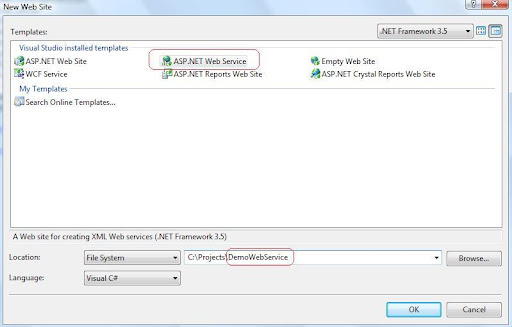
first I have opened a web service from File>New web site > web service named "DemoWebService".
now in the solution explorer we can a Service.asmx file and the Service.cs file in App_Code . I have added another web service named WebServiceTest.asmx so a WebServiceTest.cs file also added in App_Code folder.
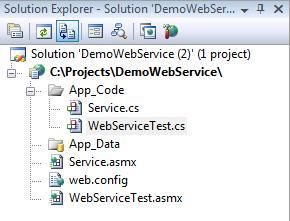
we will basically work with *.cs file to make the service.
I opened the WebServiceTest.cs file and there is a demo web method named Hello World. So I will create another method named "GetValue" which will also return a string.

using System;
using System.Collections;
using System.Linq;
using System.Web;
using System.Web.Services;
using System.Web.Services.Protocols;
using System.Xml.Linq;
/// <summary>
///
Summary description for WebServiceTest
/// </summary>
[WebService(Namespace = "http://tempuri.org/")]
[WebServiceBinding(ConformsTo = WsiProfiles.BasicProfile1_1)]
// To allow this Web Service to be called from script, using ASP.NET AJAX, uncomment the following line.
// [System.Web.Script.Services.ScriptService]
public class WebServiceTest : System.Web.Services.WebService {
public WebServiceTest () {
//Uncomment the following line if using designed components
//InitializeComponent();
}
[WebMethod]
public string HelloWorld() {
return "Hello World";
}
[WebMethod]
public string GetValue()
{
string valueString = "the result of your logic.";
return valueString;
}
}
We have to add the [WebMethod]  attribute before starting any method which will serve the web service.

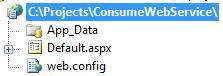
Now i will add another web site named "ConsumeWebService" which will be used to consume the web service. and add web reference to the site as bellow.
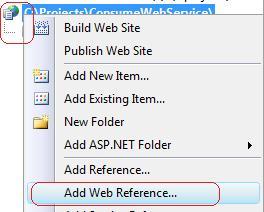
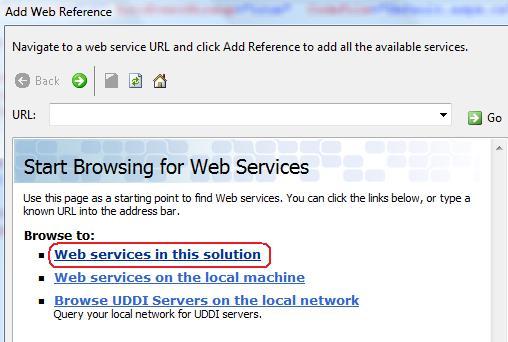
for the simplicity I have chosen the Web service in this solution( you can choose you own type as you needed for the further use).
now we will see  our Class file which we have created in our web service, I have select the WebServiceTest for the implementing.  

Now we will sell our methods in the next window, now I have selected the web reference name as "WebserviceTest" and add the reference .
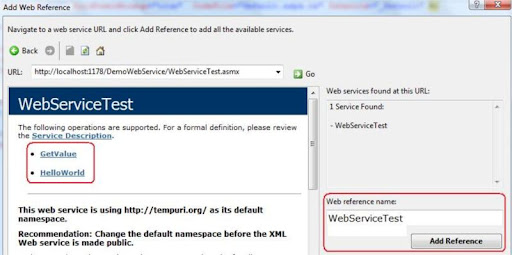
for the simplicity I will skip the  discussion of  *.disco & *.wsdl file,this file are basically needed for communication between our application and web service.

now I open the Default.aspx.cs file and add the WebServiceTest namespace and call the Method of web service as following.
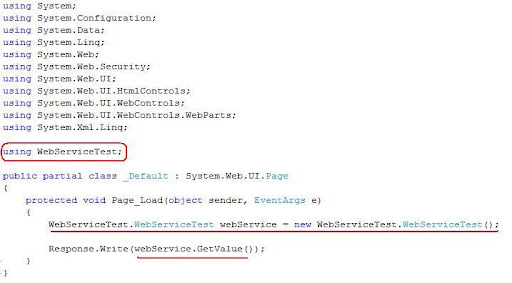
no compile the web site and and enjoy the service.

BYE

Tuesday, October 21, 2008

Captcha generate with ASP.NET & C#

Hello all

Today I will demonstrate how to generate captcha with asp.net & C# . though there are many .NET plugin and controls to serve the purpose but my focus is to generate the a random image and its manipulation with the help of .NET framework.

First open a web project and add a "Web user control" , in the example the name of my control is "ImageGeneratorControl.ascx" . the purpose of the control is to generate a image according to the random character.

Now open the  "ImageGeneratorControl.ascx.cs" file (i used the code behind method for the example.) , to generate image we have to use System.Drawing base class.

firstly we have to make a Bitmap type object where the image will generate, then for the texture we have to take a Graphics type object and manipulate the our random string there, after that we will sat the content type and save the Bitmap object stream so that it may  generate a image file, finally we have to dispose our objects.

there is a method named "RandomString" which will take the length of sting to be generate as parameter, in the method i have generate a random number and convert the number into string.In an addition the string will be save in Session.

The code of the  "ImageGeneratorControl.ascx.cs" is as bellow :

using System;
using System.Drawing;

public partial class ImageGeneratorControl : System.Web.UI.UserControl
{
    protected void Page_Load(object sender, EventArgs e)
    {
        Bitmap objBmp = new Bitmap(100, 30);
        Graphics objGraphics ;
        Font objFont = new Font("Arial", 16, FontStyle.Bold);

        objGraphics = Graphics.FromImage(objBmp);
        objGraphics.Clear(Color.WhiteSmoke);

        objGraphics.TextRenderingHint = System.Drawing.Text.TextRenderingHint.AntiAlias;
        objGraphics.DrawString(this.RandomString(6), objFont, Brushes.Gray, 3, 3);

        Response.ContentType = "image/GIF";
        objBmp.Save(Response.OutputStream, System.Drawing.Imaging.ImageFormat.Gif);

        objBmp.Dispose();
        objGraphics.Dispose();
        objFont.Dispose();
    }

    private string RandomString(int length)
    {
        Random rand = new Random();
        char ch;

        System.Text.StringBuilder randString = new System.Text.StringBuilder();

        for(int i = 0 ; i<length; i++)
        {
            ch = Convert.ToChar(Convert.ToInt32((Math.Floor(rand.NextDouble() * 26) + 65)));
            randString.Append(ch);
        }
        Session["CaptchaString"] = randString.ToString().ToLower();
        return randString.ToString().ToLower();    
    }
}

now we have to place that control in a aspx page (we also can handle it with HTTPHandler but for the simplicity i have used a aspx page which will act as a "GIF" image)

so i have taken a Image.aspx file and register the Control as following:

<%@ Page Language="C#" AutoEventWireup="true"  CodeFile="Image.aspx.cs" Inherits="_Image" %>

<%@ Register src="ImageGeneratorControl.ascx" tagname="ImageGeneratorControl" tagprefix="uc1" %>

<!DOCTYPE html PUBLIC "-//W3C//DTD XHTML 1.0 Transitional//EN" "http://www.w3.org/TR/xhtml1/DTD/xhtml1-transitional.dtd">

<head runat="server">

</head>
<body>
    <form id="form1" runat="server">
      <uc1:ImageGeneratorControl ID="ImageGeneratorControl1" runat="server" />                     
    </form>
</body>

Now this Image.aspx file will act as a Image . What we have to do now is include the Image.aspx page in our main aspx file where the image will be visible. i have used Container.aspx file to generate the captcha as following:

<%@ Page Language="C#" AutoEventWireup="true" CodeFile="Container.aspx.cs" Inherits="Container" %>

<!DOCTYPE html PUBLIC "-//W3C//DTD XHTML 1.0 Transitional//EN" "http://www.w3.org/TR/xhtml1/DTD/xhtml1-transitional.dtd">

<html xmlns="http://www.w3.org/1999/xhtml">
<head runat="server">
    <title>Captcha Page</title>
</head>
<body>
    <form id="form1" runat="server">
    <div><img src="Image.aspx" /></div>
    </form>
</body>
</html>

now you can protect the form from spamming according to your logic,session and image data. 

BYE