google analytics

Monday, December 29, 2008

Namespace in ASP.NET

Commonly Used Types and Namespaces in ASP.NET

System.Web
HttpApplication
HttpCookie
HttpRequest
HttpResponse
HttpRuntime
HttpServerUtility

System.Web.ApplicationServices *NEW
AuthenticationService NEW
ProfileService NEW
RoleService NEW

System.Web.Caching
Cache

System.Web.ClientServices *NEW
ClientFormsIdentity NEW
ClientRolePrincipal NEW
ConnectivityStatus NEW

System.Web.ClientServices.Providers *NEW
ClientFormsAuthenticationMembershipProvider NEW
ClientRoleProvider NEW

System.Web.Compilation
BuildProvider

System.Web.Configuration
WebConfigurationManager *NEW

System.Web.Hosting
ApplicationManager

System.Web.Management
WebBasedEvent

System.Web.Security
FormsAuthentication
FormsIdentity
Membership
Roles

System.Web.SessionState
HttpSessionState

System.Web.UI
Control
MasterPage
Page
ScriptManager NEW
System.Web.UI
UpdatePanel NEW
UpdateProgress NEW
UserControl

System.Web.UI.HtmlControls
HtmlButton
HtmlControl
HtmlForm
HtmlInputControl

System.Web.UI.WebControls
Content
DetailsView
FormView
GridView
LinqDataSource
ListView
LogIn
Menu
ObjectDataSources
TreeView
Wizard

System.Web.UI.WebControls.WebParts
WebPart

*New - New namespaces in .NET framework 3.5

[Source]

That's all for the day.
BYE

User ScrumPad for your Agile based projects.

Friday, December 5, 2008

MySQL multiple table update & Regular Expression

Hello all

Though its a very simple process but we usually don't do this stuff too much unless we are bound to do that.In this article I will show how to update a table data with another table depending on another table & another will be a simple regular expression in MySQL query.

In the example I have 'new_users' table to update with the data of 'listings' table depending on the condition or 'users' table. and the table structure is as bellow.

'new_users' :
userID,phone,user_state
'listings' :
listID,userID,phone
'users':
countID,userID,category

Now the scenario is I have to update the phone of new_users from the listings tables phone of same userID but only who are only 'Admin' which we may found in users table's  category field. So the query will be as following

-- Update from listings for 'Admin'
update listings, new_users, users
set
new_users.phone = listings.phone 
where
users.category = 'Admin' &&
listings.userID = users.userID &&
users.userID = new_users.userID
Now come to the second part, we can apply regular expression in our MySQL query as follow:
-- Update all user_state to null which contains invalid character
update new_users
set
new_users.user_state = null
where
new_users.user_state REGEXP '[1234567890~!@#$%^&*()_+|}{":?><,./;]'

The query will set null to user_state field if user_state field contains none but a-z & A-Z previously.

I have also some collection or regular expression for MySQL which i have collected from different site.

A very simple example illustrating this is to select all the records from MyTable for which MyField starts with "A"

SELECT * FROM  MyTable WHERE MyField REGEXP '^a';
Please take a look to the list below in order to find more information for the available options MySQL Regular Expressions

Matches zero or more instances of the string preceding it

Matches one or more instances of the string preceding it

Matches zero or one instances of the string preceding it

Matches any single character
[xyz] 
Matches any of x, y, or z (the characters within the brackets)
[A-Z] 
Matches any uppercase letter
[a-z] 
Matches any lowercase letter
[0-9] 
Matches any digit 

Anchors the match from the beginning 

Anchors the match to the end

Separates strings in the regular expression
{n,m} 
String must occur at least n times, but no more than n  
{n} 
String must occur exactly n times
{n,| 
String must occur at least n times

[Source]


That's all for the day.
BYE
User ScrumPad for your Agile based projects.

Friday, November 28, 2008

Isolated Unit Test of Business Logic With NMock in TDD

Hello All

In test driven development its always needed to test a particular project tested with make it isolate ( test with removing dependency from other projects ), In this scenario we virtually create the input set which will be produced from other projects(class,methods etc) and test whether our testable methods are functioning with that input set or not.

To do that we have to make mock of the dependent objects. In the example bellow I have shown how to test a business logic layer with isolating it from data access layer.I have created three projects Web.Data , Web.Core & BL.Test .

The Web.Data project contains the Data Access Layer which will be responsible for pulling data from the data source,but as we are isolating our business logic layer from this project so in the example I will not completely  implement our desired method( as it will not be executed).

To do that we need some tools such as NMock and NUnit . We will found the NMock.dll , nunit.core & nunit.framework in both of its bin folder where we extract or install those.

our Web.Data contains only two files one is IMockDAL.cs interface and MockDAL.cs class.

IMockDAL.cs interface :

using System.Collections.Generic;

namespace Web.Data
{
   public interface IMockDAL
    {
       /* The method will return a string list of
        * active member's name from data source .
        */
        List<string> GetNameListDAL(bool active);
    }
} 
MockDAL.cs Class :
using System;
using System.Collections.Generic;

namespace Web.Data
{
    public class MockDAL:IMockDAL
    {
        #region IMockDAL Members

        /* This method will not be executed during the test,
         * as we will do mock of this method.         
         */
       public List<string> GetNameListDAL(bool active)
        {
            throw new NotImplementedException();
        }

        #endregion
    }
}
In our Web.Core there are also two files , one is IEmployeeService.cs interface & EmployeeService.cs the class file. in this project we have to add reference of Web.Data project as it has a dependency over that.
IEmployeeService.cs  interface :
using System.Collections.Generic;
using Web.Data;

namespace Web.Core
{
   public interface IEmployeeService
    {
        IMockDAL MockDAL { set; get; }
        List<string> GetAllEmployee();
    }
}
EmployeeService.cs Class :
using System.Collections.Generic;
using Web.Data;

namespace Web.Core
{
   public class EmployeeService : IEmployeeService
    {
        /* The MockDAL property will be used to assign
         * DAL through our mock object.
         */
        public IMockDAL MockDAL { set; get; }

        public EmployeeService()
        {
            MockDAL = new MockDAL();        
        }

        #region IEmployeeService Members

        /* The "GetAllEmploye" will call the "GetNameListDAL"
         * from the mock object. For the sake of simplicity 
         * I just call the DAL,not did any other operation.
        */

        public List<string> GetAllEmployee()
        {
            return MockDAL.GetNameListDAL(true);
        }

        #endregion
    }
} 
In BL.Test project we have to add some reference as it have dependency over  couple of projects and DLLs . We have to add reference of Web.Data & Web.Core and we also have to add NMock.dll , nunit.core & nunit.framework .In this project we have a class file named MockTest.cs
using System.Collections.Generic;
using NMock2;
using NUnit.Framework;
using Web.Data;
using Web.Core;

namespace BL.Test
{
    [TestFixture]
    public class MockTest
    {
        /* Assign property of our object that will be executed.
         */
        public Mockery _mock;
        public IMockDAL _mockDAL;
        public IEmployeeService _employeeService; 

        [SetUp]
        public void init()
        {
            /* initializing our objects.
             */
            _mock = new Mockery();
            _mockDAL = _mock.NewMock<IMockDAL>();
            _employeeService = new EmployeeService();
            _employeeService.MockDAL = _mockDAL;

        }

        [Test]
        public void TestEmployeeCount()
        {
            /* In the list bellow we are creating our virtual list of
             * string, which we are expecting after calling the DAL
             * this list will be returned.
             */
            List<string> employeeList = new List<string>();
            string emp = "Maix";
            string emp2 = "Pain";
            employeeList.Add(emp);
            employeeList.Add(emp2);


            /* _mockDAL -> is our mocked DAL object.
             * GetNameListDAL -> is one of the method name of the _mockDAL object.
             * With(true) -> the single boolean parameter of the GetNameListDAL method.
             * employeeList -> The expecter return value from the GetNameListDAL method.
             */
            Expect.Once.On(_mockDAL).Method("GetNameListDAL").With(true).Will( Return.Value(employeeList));

            List<string> employeeListResult = _employeeService.GetAllEmployee();

            /* Verify the mock object is executed successfully with its expectation.
             */
            _mock.VerifyAllExpectationsHaveBeenMet();

            Assert.AreNotEqual(null, employeeListResult);
        }
    }
}
To make it run we can set the project as our startup project and configure the NUnit .

That's all for the day.

BYE
User ScrumPad for your Agile based projects. 
 

Friday, November 21, 2008

UI test with WatiN for TDD in .NET

Hello all

Today I will show how to test UI ( User Interfaces ) in .NET with WatiN . WatiN is UI test framework. Though its a very simple but i have felt the documentation is not rich enough with example. So i have taken an initiative to make it more userfriendly for the developers.

I will not emphasize on how to configure WatiN as its already well documented in the following links. What i will try to do is make familiar with HTML controls that's needed to be validated .

Follow accordingly to configure WatiN :

  1. Add reference as the documentation of WatiN, you dont have to follow the example which is documented there just add the reference.
  2. If you don't know how to add reference please see this and for NUnit see this
  3. Visit this link for a good CodeProject's example.

One of the common mistake we do is, open a class file in our website project and start the writing the test code in it, but what we have to do is make a new Class Project ,add reference in that project & select as startup project for NUnit test.

using WatiN.Core;
using NUnit.Framework;
using WatiN.Core.DialogHandlers;

namespace TestStie
{
  [TestFixture]
  public class AddArticleTest
    {

      [TestFixtureSetUpAttribute]
        public void SetUp()
        { 
        }

       [Test]
        public void TestAddArticle()
        {
            using (IE ie = new IE("http://localhost:2456/testsite/login.aspx"))
            {

                /*
                 * For textbox and textarea we have to use TextField() method and to search by 
                 * id of the control we have to use Find.ById() method & to fill the textbox 
                 * we have to use TypeText() method as following.                 
                 */

                ie.TextField(Find.ById("ctl00_UserName")).TypeText("maxpain");
                ie.TextField(Find.ById("ctl00_Password")).TypeText("c0de71~123");
               
                /*
                 * For make a check box cheked we have to do as following.                 
                 */
                ie.CheckBox(Find.ById("ctl00_chkActive")).Checked = true;
                
                /*
                 * To upload a file we have to do as bellow.
                 */
                ie.FileUpload(Find.ById("ctl00_LogoFile")).Set(@"C:\calligraphy.jpg");

                /*
                 * To selct a value form a dropdown list we have to follow as bellow.
                 * In the exmaple "Software Engineer" is selected item's value.
                 */
                ie.SelectList("ctl00_BodyPlaceHolder_ddlSkillCategory").Select("Software Engineer");

                /*
                 * For make a radio button cheked we have to do as following.                 
                 */
                ie.RadioButton(Find.ByName("ctl00$BodyPlaceHolder$rbPublish")).Checked = true;

                /*
                 * To click a link we have to do as bello
                 */
                ie.Link(Find.ByUrl("http://localhost:2456/testsite/AddArticle.aspx?id=3")).Click();

                /*
                 * To click a button we have to do as bellow.
                 */
                ie.Button(Find.ById("ctl00_LoginButton")).Click();

                /*
                 * Suppose we have to make confirm a delect action through JS confirmation box when we click 
                 * a link, then we have to do as follow.
                 */
                AlertDialogHandler alertDialogHandler = new AlertDialogHandler();
                ConfirmDialogHandler confirm = new ConfirmDialogHandler();
                using (new UseDialogOnce(ie.DialogWatcher, confirm))
                {
                    Link link = ie.Link(Find.ByUrl("http://localhost:2456/testsite/AllCaseStudy.aspx?id=5"));

                    link.ClickNoWait();
                    confirm.WaitUntilExists();
                    confirm.OKButton.Click();
                }
                ie.WaitForComplete();

                /*
                 * Now to check whether our operatin is successful or not we have to do assert test 
                 * as we do in unit test. Here ContainsText("xxxx") method returns true when it found
                 * the "xxxx" string in the page appear after any event perform.(generally we show
                 * a confirmation message after any successful event performed.) 
                 */
                Assert.IsTrue(ie.ContainsText("News Deleted successfuly"), "Deleted id not found.");
            }         
        }

        [TestFixtureTearDownAttribute]
        public void TearDown()
        {
        }
    }
}

Thats all for today.

BYE

User ScrumPad for your Agile based projects.

Wednesday, November 5, 2008

ASP.NET Form Authentication

Hello All

Today I will demonstrate how to do Form based authentication manually.Though it can be maintained through login controls which is provided by Visual Studio but sometime we need to do the task without using those controls and the required database.

First we have to perform validation for the user, then we needed to authenticate the user for different type of task according to the role of the user ( I will do role based authentication.) In my example I have a folder named "Secure" which can be access only by the Admin user. (in the following code I assume that U have done the validation for a user.)

  /* we are taking expire time duration form application settings file you may also hard coded this value.*/
double EXPIRETIMELIMIT = Convert.ToDouble(ConfigurationManager.AppSettings["EXPIRETIMELIMIT"]);

  FormsAuthentication.Initialize();
  FormsAuthentication.HashPasswordForStoringInConfigFile("password", "md5");
            
  StringBuilder roles = newStringBuilder();
  /* bellow i have added 2 roles , you may add roles according to your logic.*/
  roles.Append("Admin");
  roles.Append("Manager");
               
  FormsAuthenticationTicket ticket = new FormsAuthenticationTicket(1, "User Name", DateTime.Now, DateTime.Now.AddMinutes(EXPIRETIMELIMIT), true, roles.ToString(), FormsAuthentication.FormsCookiePath);         
  string hash = FormsAuthentication.Encrypt(ticket);      
  HttpCookie cookie = new HttpCookie(FormsAuthentication.FormsCookieName, hash);
/*We have to set the cookie expire time manually,its not working which we set in the parameter  of the FormsAuthenticationTicket's constructor .*/
 cookie.Expires = DateTime.Now.AddMinutes(EXPIRETIMELIMIT); 

 if(ticket.IsPersistent)
    cookie.Expires = ticket.Expiration;

 Response.Cookies.Add(cookie);

 Response.Redirect("Admin/Home.aspx");
Now open the the Global.asax file,if its not exist in your current solution add it as a new item. Then add the following code block as bellow,which will chek the authentication in each page request.
protected void Application_AuthenticateRequest(Object sender, EventArgs e)
   {
       if (HttpContext.Current.User != null)
       {
           if (HttpContext.Current.User.Identity.IsAuthenticated)
           {
               if (HttpContext.Current.User.Identity is FormsIdentity)
               {
                   FormsIdentity identity = (FormsIdentity)HttpContext.Current.User.Identity;

                   FormsAuthenticationTicket ticket = identity.Ticket;
//         UserData is the roles which we have assigned before.
                   string[] roles = ticket.UserData.Split(new Char[] {','});
                                     
                   HttpContext.Current.User = new System.Security.Principal.GenericPrincipal(identity, roles);
                   
               }            
           }        
       }    
   }
Now its the time to securing our folder from web.config  . When any Authorized user will try to access in the Admin folder then this will check the "Admin" role for the user.
<authentication mode="Forms">
        <forms name="MYWEBAPP.ASPXAUTH"  loginUrl="TeleMarketerLogin.aspx" protection="All" path="/"/>  
    </authentication>
    <authorization>
        <deny users="?"/>
        <allow roles="Manager,Admin"/>
        <deny users="*"/>
    </authorization>

<location path="Secure">
    <system.web>
        <authorization>
        <deny users="?"/>
        <allow roles="Admin"/>
        <deny users="*"/>
        </authorization>
    </system.web>
</location>

<location path="App_Themes">
    <system.web>
        <authorization>
            <allow users="*"/>
        </authorization>
    </system.web>
</location>
thats all for today.
BYE
User ScrumPad for your Agile based projects.

Wednesday, October 22, 2008

Web service creation & consuming with ASP.NET

Hello all

Today I will show how to create web service with VS2008 and consume it in different application.
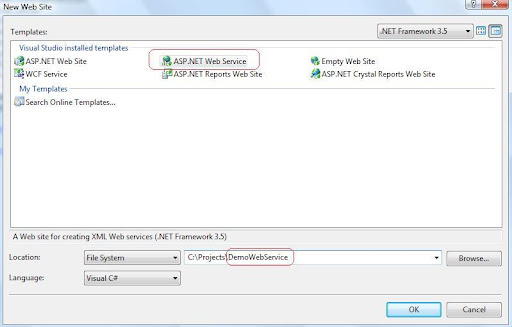
first I have opened a web service from File>New web site > web service named "DemoWebService".

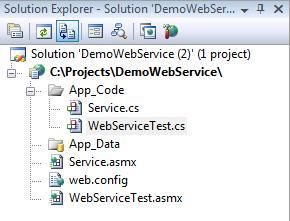
now in the solution explorer we can a Service.asmx file and the Service.cs file in App_Code . I have added another web service named WebServiceTest.asmx so a WebServiceTest.cs file also added in App_Code folder.

we will basically work with *.cs file to make the service.
I opened the WebServiceTest.cs file and there is a demo web method named Hello World. So I will create another method named "GetValue" which will also return a string.

using System;
using System.Collections;
using System.Linq;
using System.Web;
using System.Web.Services;
using System.Web.Services.Protocols;
using System.Xml.Linq;
/// <summary>
///
Summary description for WebServiceTest
/// </summary>
[WebService(Namespace = "http://tempuri.org/")]
[WebServiceBinding(ConformsTo = WsiProfiles.BasicProfile1_1)]
// To allow this Web Service to be called from script, using ASP.NET AJAX, uncomment the following line.
// [System.Web.Script.Services.ScriptService]
public class WebServiceTest : System.Web.Services.WebService {
public WebServiceTest () {
//Uncomment the following line if using designed components
//InitializeComponent();
}
[WebMethod]
public string HelloWorld() {
return "Hello World";
}
[WebMethod]
public string GetValue()
{
string valueString = "the result of your logic.";
return valueString;
}
}
We have to add the [WebMethod]  attribute before starting any method which will serve the web service.

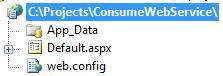
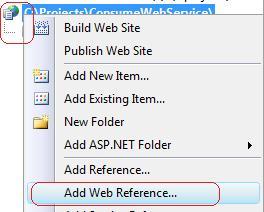
Now i will add another web site named "ConsumeWebService" which will be used to consume the web service. and add web reference to the site as bellow.


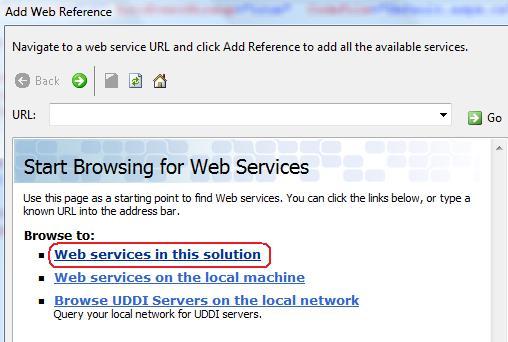
for the simplicity I have chosen the Web service in this solution( you can choose you own type as you needed for the further use).
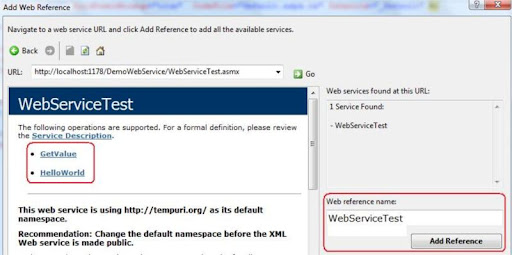
now we will see  our Class file which we have created in our web service, I have select the WebServiceTest for the implementing.  

Now we will sell our methods in the next window, now I have selected the web reference name as "WebserviceTest" and add the reference .

for the simplicity I will skip the  discussion of  *.disco & *.wsdl file,this file are basically needed for communication between our application and web service.

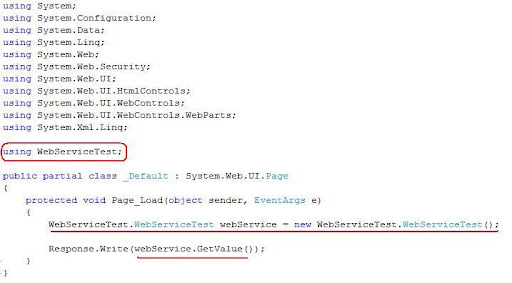
now I open the Default.aspx.cs file and add the WebServiceTest namespace and call the Method of web service as following.

no compile the web site and and enjoy the service.

BYE

Tuesday, October 21, 2008

Captcha generate with ASP.NET & C#

Hello all

Today I will demonstrate how to generate captcha with asp.net & C# . though there are many .NET plugin and controls to serve the purpose but my focus is to generate the a random image and its manipulation with the help of .NET framework.

First open a web project and add a "Web user control" , in the example the name of my control is "ImageGeneratorControl.ascx" . the purpose of the control is to generate a image according to the random character.

Now open the  "ImageGeneratorControl.ascx.cs" file (i used the code behind method for the example.) , to generate image we have to use System.Drawing base class.

firstly we have to make a Bitmap type object where the image will generate, then for the texture we have to take a Graphics type object and manipulate the our random string there, after that we will sat the content type and save the Bitmap object stream so that it may  generate a image file, finally we have to dispose our objects.

there is a method named "RandomString" which will take the length of sting to be generate as parameter, in the method i have generate a random number and convert the number into string.In an addition the string will be save in Session.

The code of the  "ImageGeneratorControl.ascx.cs" is as bellow :

using System;
using System.Drawing;

public partial class ImageGeneratorControl : System.Web.UI.UserControl
{
    protected void Page_Load(object sender, EventArgs e)
    {
        Bitmap objBmp = new Bitmap(100, 30);
        Graphics objGraphics ;
        Font objFont = new Font("Arial", 16, FontStyle.Bold);

        objGraphics = Graphics.FromImage(objBmp);
        objGraphics.Clear(Color.WhiteSmoke);

        objGraphics.TextRenderingHint = System.Drawing.Text.TextRenderingHint.AntiAlias;
        objGraphics.DrawString(this.RandomString(6), objFont, Brushes.Gray, 3, 3);

        Response.ContentType = "image/GIF";
        objBmp.Save(Response.OutputStream, System.Drawing.Imaging.ImageFormat.Gif);

        objBmp.Dispose();
        objGraphics.Dispose();
        objFont.Dispose();
    }

    private string RandomString(int length)
    {
        Random rand = new Random();
        char ch;

        System.Text.StringBuilder randString = new System.Text.StringBuilder();

        for(int i = 0 ; i<length; i++)
        {
            ch = Convert.ToChar(Convert.ToInt32((Math.Floor(rand.NextDouble() * 26) + 65)));
            randString.Append(ch);
        }
        Session["CaptchaString"] = randString.ToString().ToLower();
        return randString.ToString().ToLower();    
    }
}

now we have to place that control in a aspx page (we also can handle it with HTTPHandler but for the simplicity i have used a aspx page which will act as a "GIF" image)

so i have taken a Image.aspx file and register the Control as following:

<%@ Page Language="C#" AutoEventWireup="true"  CodeFile="Image.aspx.cs" Inherits="_Image" %>

<%@ Register src="ImageGeneratorControl.ascx" tagname="ImageGeneratorControl" tagprefix="uc1" %>

<!DOCTYPE html PUBLIC "-//W3C//DTD XHTML 1.0 Transitional//EN" "http://www.w3.org/TR/xhtml1/DTD/xhtml1-transitional.dtd">

<head runat="server">

</head>
<body>
    <form id="form1" runat="server">
      <uc1:ImageGeneratorControl ID="ImageGeneratorControl1" runat="server" />                     
    </form>
</body>

Now this Image.aspx file will act as a Image . What we have to do now is include the Image.aspx page in our main aspx file where the image will be visible. i have used Container.aspx file to generate the captcha as following:

<%@ Page Language="C#" AutoEventWireup="true" CodeFile="Container.aspx.cs" Inherits="Container" %>

<!DOCTYPE html PUBLIC "-//W3C//DTD XHTML 1.0 Transitional//EN" "http://www.w3.org/TR/xhtml1/DTD/xhtml1-transitional.dtd">

<html xmlns="http://www.w3.org/1999/xhtml">
<head runat="server">
    <title>Captcha Page</title>
</head>
<body>
    <form id="form1" runat="server">
    <div><img src="Image.aspx" /></div>
    </form>
</body>
</html>

now you can protect the form from spamming according to your logic,session and image data. 

BYE

Friday, September 19, 2008

Simple unit test with NUnit

Hello all

Today I will show you how to do unit test of a .NET project with NUnit. NUnit is a great tool to do unit test of any .NET project.As its a third party tool so you have to download it from here . I assume that you all are familiar with unit test.For the simplicity I will show you a simple example,Once when you are habituated with this took you will find yourself in many complex test script.

first I opened an new class project named Calculation.Core.

then I added two method which will be tested through NUnit.

The class file's is "Calculation" and those two methods are DoAdd & DoSub which will add two numbers and subtract two numbers.Both's return type and parameters type are integer .

namespace Calculation.Core
{
    public class Calculation
  
{

        public int DoAdd(int firstNumber, int secondNumber)
        {
            return firstNumber + secondNumber;
        }

        public int DoSub(int firstNumber, int secondNumber)
        {
            return firstNumber - secondNumber;
        }
    }
}

now I added another class project named Calculation.Test and Add Reference of the Calculation.Core project. and also make Add DLL Reference of  NUnit's "nunit.framework.dll" from my NUnit's installed location "C:\Program Files (x86)\NUnit 2.4.8\bin\nunit.framework.dll" .This will vary according to your installation of NUnit.

now I have to include namespace in the file by typing :

using NUnit.Framework;

now we have to add the "[TestFixture]" attribute to the CalculationTest class and "[Test]" attribute to the DoAddTest ,DoFailTest & DoSubTest methods.

using NUnit.Framework;
namespace Calculation.Test
{
   [TestFixture]
    public class CalculationTest
    {
       [Test]
       public void DoAddTest()
       {
           
           Calculation.Core.Calculation sub = new  Calculation.Core.Calculation();
           int result = sub.DoSub(3,1);
           Assert.Greater(3, result);
       }

       [Test]
       public void DoSubTest()
       {
           Calculation.Core.Calculation sub = new Calculation.Core.Calculation();
           int result = sub.DoSub(3, 1);
           Assert.Greater(3, result);
       }

       [Test]
       public void DoFailTest()
       {
           Calculation.Core.Calculation sub = new Calculation.Core.Calculation();
           int result = sub.DoSub(3, 1);
           Assert.Greater(1, result);
       }
    }
}

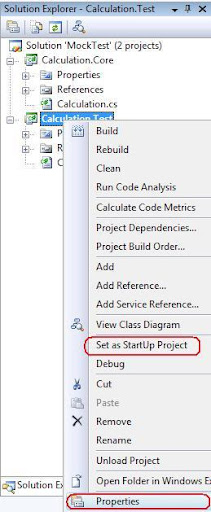
Now we have to select the Calculation.Test project as Starup project and select the "Properties" from the Solution Explorer .

Now form the Calculation.Test tab we have to select Debug then select  Start External Program and set the location of NUnit.exe then select Command line argument and write the dll name of the test project .

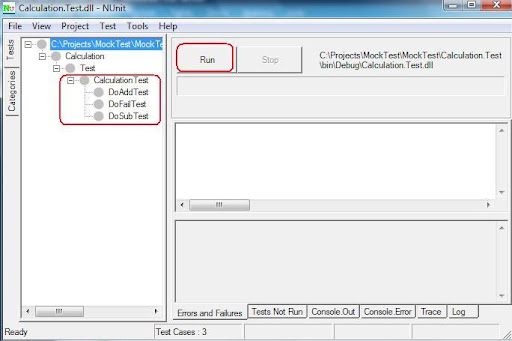
now when we will run the application then NUnit will automatically start and we have to press run button to show the unit test result.

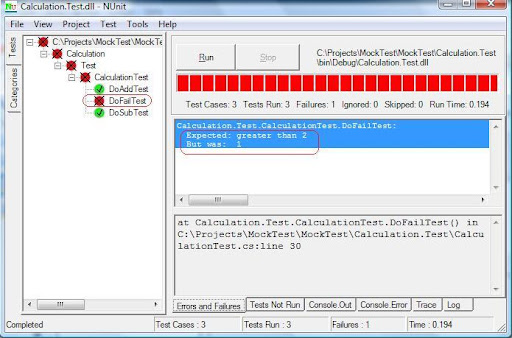
In the result we will see that the two method of our test script has passed but one fail as I didn't give the proper assert method .

in this way we can do unit test with NUnit. There are also many useful method of NUnit's to test the script.
BYE

Wednesday, August 27, 2008

Simple C# coding standard

Hello All

To day I will go through about coding standard which we must have to follow during development .

1.Pascal casing  should have to follow in Class & Method naming

example : public class TestClass{}; public void TestMethod(){};

2.Camel casing should have to follow in writing and local variable and parameter.

example : int localCounter;public void TestMethod(int counter){};

3. "_" should have to given while starting a private variable

example : private string _localAddress;

4. "I" character should have to place before the name of any interface.

example: interface IDataCollection{};

there are some vital information about coding standard here .

Bye

Friday, August 22, 2008

Simple Web Application Installer with VS2008

Hello all.

Today I will show how simple it is to make a web application installer with Visual Studio.

I have assumed that you have a project already open and now you want to make a installer for it.

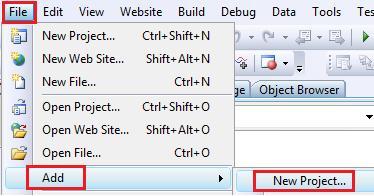
First we have to add a new project from File->Add->New Project

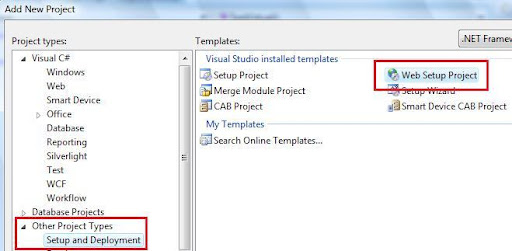
Then we have to select

Other Project Type->Setup & Deploy -> web setup project

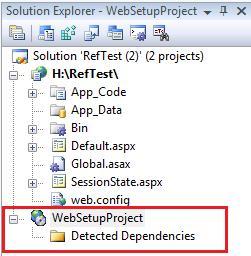
I name it "WebSetupProject" . In Solution Explorer we will found that installer project.

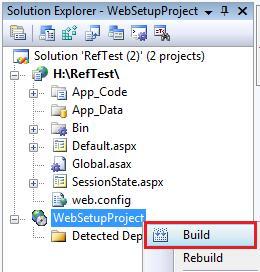
Now we have to right click over the "WebSetupProject" and click on Bulild.

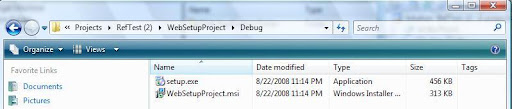
Our basic task is complete now we will get the installer in a the project's debug folder as bellow.

Bye.

Saturday, August 9, 2008

Simple Excel Data read and save with C#.NET

Hello All

Today i will demonstrate the process of Excel data read with both DataReader & DataSet . Though the Code is not optimize but its very simple to read a excel file in OLEDB.

In the example i have hard-coded the Excel file location named "Book1.xls", and the selected sheet is "Sheet1". We also have a database and a table in it named "TableInfo" where we will insert data after reading from excel file.

using System;
using System.Data;
using System.Data.SqlClient;
using System.Data.OleDb;
using System.Collections;

namespace ExcelExport
{
    class GenerateExcel
    {
        public ArrayList ColumnNames;

        public DataSet ReadExcell()
        {
            String conStr = "Provider=Microsoft.Jet.OLEDB.4.0;" + @"Data Source=C:\Documents and Settings\tanowar\Desktop\Excel\WinApp\ExcelExport\ExcelExport\Book1.xls;" + "Extended Properties=Excel 8.0;";
            string sqlConString = "Data Source=DtaBase;Initial Catalog=GPXPO;User ID=User;Password=XXX ";

            SqlConnection sqlCon = new SqlConnection(sqlConString);          

            OleDbConnection oleCon = new OleDbConnection(conStr);
            DataSet ds = new DataSet();

            try
            {
                #region DataSet

                oleCon.Open();                
                OleDbCommand oleCmd = new OleDbCommand("select * from [Sheet1$]", oleCon);

                OleDbDataAdapter oleAd = new OleDbDataAdapter();
                oleAd.SelectCommand = oleCmd;
                oleAd.Fill(ds);
                oleCon.Close();

                #endregion


                #region DataReader

                OleDbDataReader reader = oleCmd.ExecuteReader();
                while (reader.Read())
                {
                    sqlCon.Open();                    
                    SqlCommand sqlCmd = new SqlCommand("insert into TableInfo (AllotNo,BankCode,LotteryNo,BONo,Name,Shares)values('"+reader[0].ToString() +"','"+reader[1].ToString() +"','"+reader[2].ToString() +"','"+reader[3].ToString() +"','"+reader[4].ToString() +"',"+reader[5].ToString() +")",sqlCon);
                    sqlCmd.ExecuteNonQuery();
                    sqlCon.Close();
                }
               #endregion

            }
            catch (Exception exc)
            {
                exc.ToString();                
            }
            return ds;
        }
    }
}

Thursday, July 24, 2008

Simple .NET Cookie Management

Hello all

Today I will give a short description about using Cookie with .NET , Cookie is one of the most impotent thing to maintain scalability of server as well as manipulation user's information easier. Generally a Cookie enabled browser can store about 20 cookies for a single domain , so what's happen ;when you try to keep more cookie in a browser for a particular domain it discard the oldest cookie. If you don't set the expiration of a Cooke it will remain in memory till the browser session , when you close browser then the cookie is also expire , but when the expiration is set the the cookie is saved in hard drive.

We can manipulate the cookie in two ways as bellow.

// First Example
 Response.Cookies["index"].Value = "test value first";
 Response.Cookies["index"].Expires = DateTime.Now.AddDays(1);
// Second example
HttpCookie httpCookie = new HttpCookie("NewCookie");
httpCookie.Value = "tast value second";
httpCookie.Expires = DateTime.Now.AddDays(1);
Response.Cookies.Add(httpCookie);

To retrieve the Cookies information we have to do as following . But one thing we all should have to remember that each and ever time when we try to retrieve data from cookie we have to check that the cookie is no "null". If the cookie is null and we want to retrieve data from that cookie it will through an exception.

// First Example
if (Request.Cookies["index"] != null)
    Response.Write(Request.Cookies["index"].Value.ToString());
else
    Response.Write("Cookie not set.");

// Second example
if (Request.Cookies["NewCookie"] != null)
    Response.Write(Request.Cookies["NewCookie"].Value.ToString());
else
    Response.Write("Second Cookie not set.");

That's all for today .

BYE

Friday, July 18, 2008

Easy dll using in Visual Studio

Hello again

Today I will show how to use a .dll  file using Visual Studio. dll is nothing but the a complied managed code by .NET CLR (at least for this tutorial).

what I did is just wrote a simple class "Employee" in a new project named "EmployeeInformation". It has one property and a method jest to show that how to build a dll of a class and use it in another project.

Now i have build the class by right clicking over the project named "EmployeeInformation" and pressing build, For me a dll has been generated in "C:\Users\MD.Tanvir Anowar\Documents\Visual Studio 2008\Projects\RefTest\EmployeeInformation\bin\Debug\" directory named "EmployeeInformation.dll" you may found it in your Output panel at the bellow of VS after build the project.

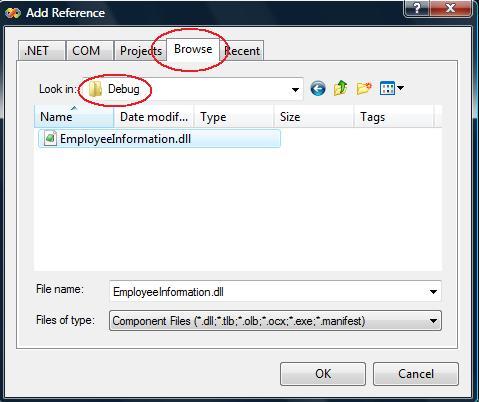
Now I have to let the dll know by my main project "RefTest", to do this i have to right click on my "RefTest" project and Click over Add Reference .

Now i have to browse and select the "EmployeeInformation.dll"

to user the dll now we have to instantiate the class in our main porject's class by typing:

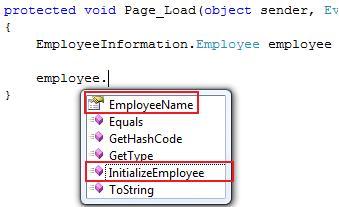
EmployeeInformation.Employee employee = new EmployeeInformation.Employee();

now in employee object we will get the our desire property of the class as following

Thank you.

Sunday, July 13, 2008

Simple multiple projects add to Visual Studio

Hello all

Today I will explain how to add multiple project in Visual Studio .(That could be use for n-tier architecture or for other purpose). In .NET or in any language its wanted to fragment individual module of a system should have to be separated. In .NET we do this by adding multiple project in a single solution.

First open a new project ( in the example I have used new website named Emp ).

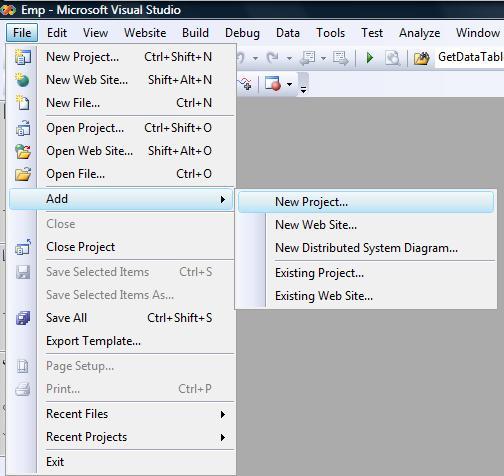
now add a new project from File > Add > New Project ( which will be a layer of Emp Website)

and then select Windows > > Class Library and give a name in the example I have named "DataAccessLayer".

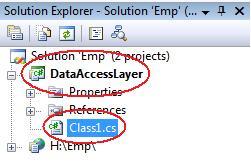
The initial task has been completed. Now in you solution explorer you will find new project named  "DataAccessLayer" and a default class named Class1.cs which you can rename according to your naming convention.

Now the most vital thing to do is let our main website "Emp" be referenced with the "DataAccessLayer" project ,otherwise we will not be able to use the resource of "DataAccessLayer" in "Emp"  !

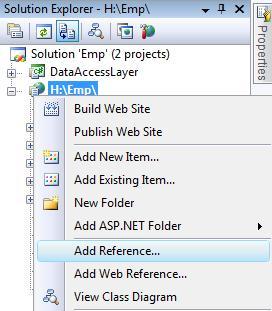
To do that we have to select out website "Emp" and right click on it after that we have to select Add Reference .

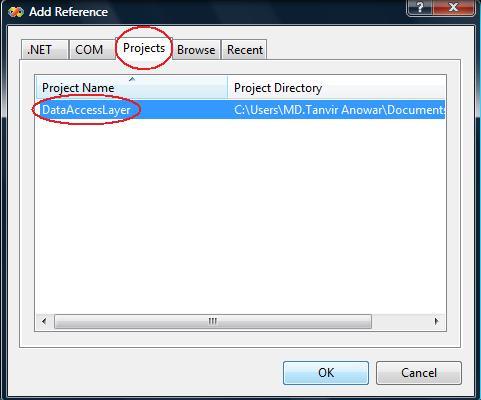
After a short time a window will came named Add Reference, from there we have to select the Project tab and let select the desired project for us its "DataAccessLayer" then click ok.

the task is done now we will be able to use the "DataAccessLayer" project's resource from our "Emp" website .

There is little additional task to do ..

We have to define the name of the project                  

"using DataAccessLayer;"  at the top of the classes which will use the resource of the "DataAccessLayer" as following.

that's all for today

Bye 

Saturday, July 12, 2008

Simple XML parsing with XPath

Hello again. Today i will talk about how to purse XML simply with .NET's XPath features.We know XML now days gets very important thing for transferring or what ever. I will show how simply we can Purse a XML file. Suppose we have a XML file named "Sample.xml" and the structure of that XML file is as bellow:
   1:  <?xml version="1.0" encoding="utf-8" ?>
   2:  <items>
   3:    <item>
   4:      <name>Tanvir</name>
   5:      <id>03-04304-3</id>
   6:    </item>
   7:    <item>
   8:      <name>Anowar</name>
   9:      <id>04-04304-2</id>
  10:    </item>
  11:  </items>
now open a Default.aspx page and import the sub class Xml,and Xml.XPath by writing as bellow:
   1:  using System.Xml;
   2:  using System.Xml.XPath;
Now making a XPathDocument document we can iterate our queries as given in nav.Select("/items/item/name") . here /items/item/name is our query ,where Items is the root node . item is the child node and name is our desired node which is going to be explored.
The following code is in C#.NET for exploring XML node with XPath.
 XPathDocument xmlDoc = new XPathDocument(MapPath("Sample.xml"));
 XPathNavigator nav = xmlDoc.CreateNavigator();
 XPathNodeIterator iterate = nav.Select("/items/item/name");
 while(iterate.MoveNext())
 { 
    Response.Write(iterate.Current.Name); // print the node name
    Response.Write("&nbsp");
    Response.Write(iterate.Current.Value); // print the value
    Response.Write("<br />"); 
  }

Simple Mail send Through .NET

Hello all ,
Today i will describe how to send mail through .NET
First we have to configure the SMTP mail server . In this context i have assumed you mail server has been configured (including web.config ).
Now we have to import

using System.Net;
using System.Net.Mail;
And through the following code we will able to send mail with attachment.
MailMessage msg = new MailMessage();
msg.From = new MailAddress("mail@test.com");
msg.To.Add(new MailAddress("mail_1@test.com"));
msg.To.Add(new MailAddress("mail_2@test.com"));
msg.CC.Add(new MailAddress("mail_3@test.com"));
msg.Bcc.Add(new MailAddress("mail_4@test.com"));
msg.Attachments.Add(new Attachment(@"c:\file.txt"));
msg.Subject = "This is a test mail";
msg.Body = "This is the body of the mail";
SmtpClient client = new SmtpClient();
client.Send(msg);

Saturday, July 5, 2008

Event fire at certain time.

(This article is taken from one of my other blog.) from few days one thing is clicking in my head very simple but not initiated before.so i have posted the problem in phpfreaks forum and got some useful solutions : #1 : hi i want to know how to run continuous service which is written in php? for example : i want to inform through email to my clients in a particular time automatically , how to do it ? Thanking you Tanvir.
=> Cron job.
# 2 : but there is one question more, if i use corn job then i must have access to modify the etc/corntab in any linux server, generally when we hosting a site then we dont have the permission to modify any server scripts like corntab unless its a dedicated server. is there any other solution to do the job avoiding this problem? =>If you don't have access to the crontab, then you most certainly won't have access to the init scripts required to run a service. => ot entirely true. On many 'shared' hosting plans that use stuff like cpanel, they will allow you to set up your own cron jobs. Fairly easily too. =>if not many people provide external crontab access so that you can have a psedo cron tab by having another server ping your cron job page. they might cost you a monthly fee, but it be better than switching hosting companies

Easy Northwind Database installation.

Its pretty much needed to work with a existing relational database to test any new features of a language,but its really tough to get it at the right moment. We can easily get one from Microsoft's Northwind database.First we have to install SQL Server Management Studio and then download the sample database form here . After installing the SampleDB, it will create a directory named "C:\SQL Server 2000 Sample Databases" . In this Database we will get some files including NORTHWND.MDF.To use it, first we have some inital tasks to do ... 1. In the first step we have to double click on "instnwnd.sql" which is in the "C:\SQL Server 2000 Sample Databases" folder , after click SQL Server Management Studio will automaticly open then we have to press the "Execute" button. 2. In the similar way we also wave to double click on "instpubs.sql" and do the same thing. after that when we connect our SQL server we foud our desired NORTHWIND database . in the above topic i have escaped many vital technical issues just to make the article simple any easy to read as well as easy to impliment. hope it will work. have a nice day.

Tuesday, June 24, 2008

LINK Exchange

The Crystal Company
Retailer of crystal gifts. Link partner for home improvement, construction, online, jobs, legal, lawyer, blogs, jewelry, web design & hosting, real estate, finance, financial, travel, business, shopping, gambling, insurance & mortgage, house sites.
Link Market - Free Link Exchange, Link Swap and Link Trade Directory
Have you ever tried to exchange links, swap links, or trade links? Was it hard? Use link market instead; - it is easy to use, free and very smart. It will save you hours of work.
Stock Option Trading
55 hours of online options trading strategies, consistent profit with stock option trading for a living, how to trade options consistently for profit.
The Wind Chime Company
Retailer of wind chimes. Link partner for home improvement, construction, online, jobs, legal, lawyer, blogs, jewelry, web design hosting, real estate, finance, financial, travel, business, shopping, gambling, insurance & mortgage, house site
The Home Decorating Company
Retailers of bedding & home decor. Link partner for home improvement, construction, online, jobs, legal, lawyer, blogs, jewelry, web design & hosting, real estate, finance, financial, travel, business, shopping, gambling, insurance & mortgage sites
The Platform Beds Company
Retailer of platform beds. Link partner for home improvement, construction, online, jobs, legal, lawyer, blogs, jewelry, web design & hosting, real estate, finance, financial, travel, business, shopping, gambling, insurance & mortgage, house sites.
Mekong Delta Tours
Vietnam cruise tours, halong bay cruises, mekong delta cruise, mekong delta tours, mekong river travel, halong bay tours
The Baby Bedding Company
Retailer of baby bedding. Link partner for home improvement, construction, online, jobs, legal, lawyer, blogs, jewelry, web design hosting, real estate, finance, financial, travel, business, shopping, gambling, insurance & mortgage, house site
The Grandfather Clocks Company
Retailer of grandfather clocks. Link partner for home improvement, construction, online, jobs, legal, lawyer, blogs, jewelry, web design hosting, real estate, finance, financial, travel, business, shopping, gambling, insurance & mortgage, house site
Investing
Visit lucrative investing. Free investment picks, services, resources, and news for the average investor to help level the playing field. We help make every investment a lucrative one. ***webmasters we are a "do" follow blog. ***
The Water Fountains Company
Retailer of water fountains & ponds. Link partner for home improvement, construction, online, jobs, legal, lawyer, blogs, jewelry, web design & hosting, real estate, finance, financial, travel, business, shopping, gambling, insurance & mortgage site
Promotional Items
The super store for promotional items and promotional products. Over 950 000 custom promotional products and business promotional items for trade show giveaways, corporate gifts, school promotions and business advertising.
Luxury Bali Villas
Sulubancliffbali is the premium luxury villa located at the southwest tip of bali.