google analytics

Wednesday, August 27, 2008

Simple C# coding standard

Hello All

To day I will go through about coding standard which we must have to follow during development .

1.Pascal casing  should have to follow in Class & Method naming

example : public class TestClass{}; public void TestMethod(){};

2.Camel casing should have to follow in writing and local variable and parameter.

example : int localCounter;public void TestMethod(int counter){};

3. "_" should have to given while starting a private variable

example : private string _localAddress;

4. "I" character should have to place before the name of any interface.

example: interface IDataCollection{};

there are some vital information about coding standard here .

Bye

Friday, August 22, 2008

Simple Web Application Installer with VS2008

Hello all.

Today I will show how simple it is to make a web application installer with Visual Studio.

I have assumed that you have a project already open and now you want to make a installer for it.

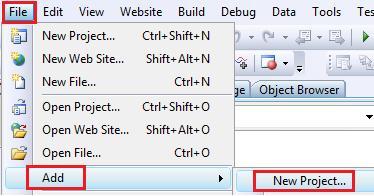
First we have to add a new project from File->Add->New Project

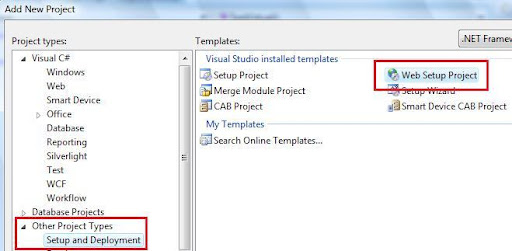
Then we have to select

Other Project Type->Setup & Deploy -> web setup project

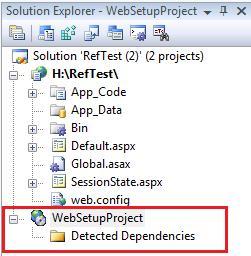
I name it "WebSetupProject" . In Solution Explorer we will found that installer project.

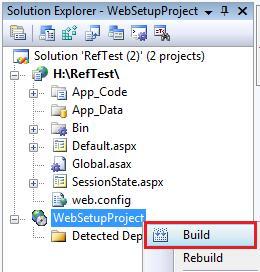
Now we have to right click over the "WebSetupProject" and click on Bulild.

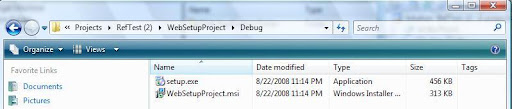
Our basic task is complete now we will get the installer in a the project's debug folder as bellow.

Bye.

Saturday, August 9, 2008

Simple Excel Data read and save with C#.NET

Hello All

Today i will demonstrate the process of Excel data read with both DataReader & DataSet . Though the Code is not optimize but its very simple to read a excel file in OLEDB.

In the example i have hard-coded the Excel file location named "Book1.xls", and the selected sheet is "Sheet1". We also have a database and a table in it named "TableInfo" where we will insert data after reading from excel file.

using System;
using System.Data;
using System.Data.SqlClient;
using System.Data.OleDb;
using System.Collections;

namespace ExcelExport
{
    class GenerateExcel
    {
        public ArrayList ColumnNames;

        public DataSet ReadExcell()
        {
            String conStr = "Provider=Microsoft.Jet.OLEDB.4.0;" + @"Data Source=C:\Documents and Settings\tanowar\Desktop\Excel\WinApp\ExcelExport\ExcelExport\Book1.xls;" + "Extended Properties=Excel 8.0;";
            string sqlConString = "Data Source=DtaBase;Initial Catalog=GPXPO;User ID=User;Password=XXX ";

            SqlConnection sqlCon = new SqlConnection(sqlConString);          

            OleDbConnection oleCon = new OleDbConnection(conStr);
            DataSet ds = new DataSet();

            try
            {
                #region DataSet

                oleCon.Open();                
                OleDbCommand oleCmd = new OleDbCommand("select * from [Sheet1$]", oleCon);

                OleDbDataAdapter oleAd = new OleDbDataAdapter();
                oleAd.SelectCommand = oleCmd;
                oleAd.Fill(ds);
                oleCon.Close();

                #endregion


                #region DataReader

                OleDbDataReader reader = oleCmd.ExecuteReader();
                while (reader.Read())
                {
                    sqlCon.Open();                    
                    SqlCommand sqlCmd = new SqlCommand("insert into TableInfo (AllotNo,BankCode,LotteryNo,BONo,Name,Shares)values('"+reader[0].ToString() +"','"+reader[1].ToString() +"','"+reader[2].ToString() +"','"+reader[3].ToString() +"','"+reader[4].ToString() +"',"+reader[5].ToString() +")",sqlCon);
                    sqlCmd.ExecuteNonQuery();
                    sqlCon.Close();
                }
               #endregion

            }
            catch (Exception exc)
            {
                exc.ToString();                
            }
            return ds;
        }
    }
}