google analytics

Thursday, July 24, 2008

Simple .NET Cookie Management

Hello all

Today I will give a short description about using Cookie with .NET , Cookie is one of the most impotent thing to maintain scalability of server as well as manipulation user's information easier. Generally a Cookie enabled browser can store about 20 cookies for a single domain , so what's happen ;when you try to keep more cookie in a browser for a particular domain it discard the oldest cookie. If you don't set the expiration of a Cooke it will remain in memory till the browser session , when you close browser then the cookie is also expire , but when the expiration is set the the cookie is saved in hard drive.

We can manipulate the cookie in two ways as bellow.

// First Example
 Response.Cookies["index"].Value = "test value first";
 Response.Cookies["index"].Expires = DateTime.Now.AddDays(1);
// Second example
HttpCookie httpCookie = new HttpCookie("NewCookie");
httpCookie.Value = "tast value second";
httpCookie.Expires = DateTime.Now.AddDays(1);
Response.Cookies.Add(httpCookie);

To retrieve the Cookies information we have to do as following . But one thing we all should have to remember that each and ever time when we try to retrieve data from cookie we have to check that the cookie is no "null". If the cookie is null and we want to retrieve data from that cookie it will through an exception.

// First Example
if (Request.Cookies["index"] != null)
    Response.Write(Request.Cookies["index"].Value.ToString());
else
    Response.Write("Cookie not set.");

// Second example
if (Request.Cookies["NewCookie"] != null)
    Response.Write(Request.Cookies["NewCookie"].Value.ToString());
else
    Response.Write("Second Cookie not set.");

That's all for today .

BYE

Friday, July 18, 2008

Easy dll using in Visual Studio

Hello again

Today I will show how to use a .dll  file using Visual Studio. dll is nothing but the a complied managed code by .NET CLR (at least for this tutorial).

what I did is just wrote a simple class "Employee" in a new project named "EmployeeInformation". It has one property and a method jest to show that how to build a dll of a class and use it in another project.

Now i have build the class by right clicking over the project named "EmployeeInformation" and pressing build, For me a dll has been generated in "C:\Users\MD.Tanvir Anowar\Documents\Visual Studio 2008\Projects\RefTest\EmployeeInformation\bin\Debug\" directory named "EmployeeInformation.dll" you may found it in your Output panel at the bellow of VS after build the project.

Now I have to let the dll know by my main project "RefTest", to do this i have to right click on my "RefTest" project and Click over Add Reference .

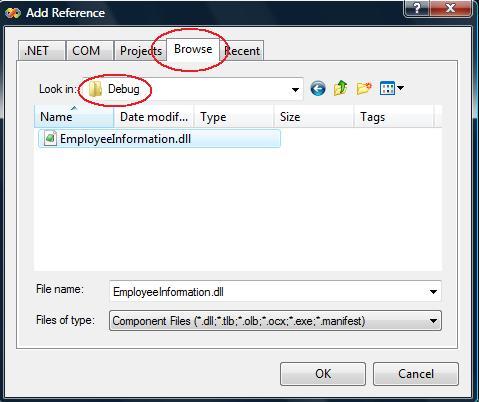
Now i have to browse and select the "EmployeeInformation.dll"

to user the dll now we have to instantiate the class in our main porject's class by typing:

EmployeeInformation.Employee employee = new EmployeeInformation.Employee();

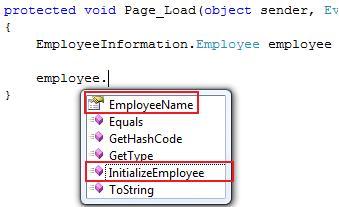
now in employee object we will get the our desire property of the class as following

Thank you.

Sunday, July 13, 2008

Simple multiple projects add to Visual Studio

Hello all

Today I will explain how to add multiple project in Visual Studio .(That could be use for n-tier architecture or for other purpose). In .NET or in any language its wanted to fragment individual module of a system should have to be separated. In .NET we do this by adding multiple project in a single solution.

First open a new project ( in the example I have used new website named Emp ).

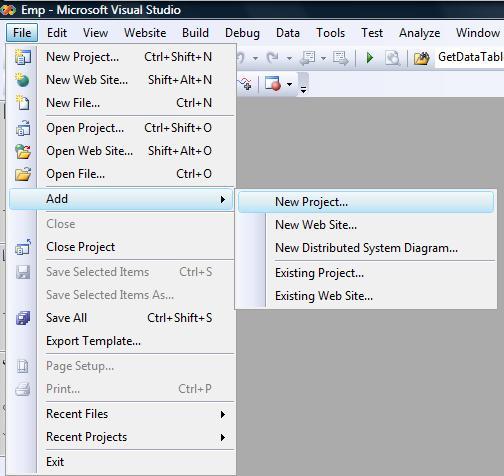
now add a new project from File > Add > New Project ( which will be a layer of Emp Website)

and then select Windows > > Class Library and give a name in the example I have named "DataAccessLayer".

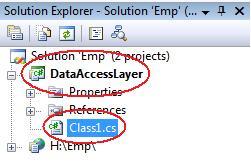
The initial task has been completed. Now in you solution explorer you will find new project named  "DataAccessLayer" and a default class named Class1.cs which you can rename according to your naming convention.

Now the most vital thing to do is let our main website "Emp" be referenced with the "DataAccessLayer" project ,otherwise we will not be able to use the resource of "DataAccessLayer" in "Emp"  !

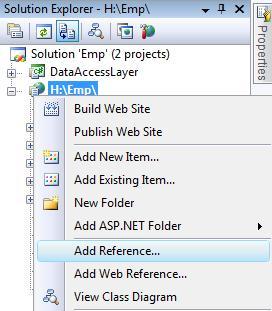
To do that we have to select out website "Emp" and right click on it after that we have to select Add Reference .

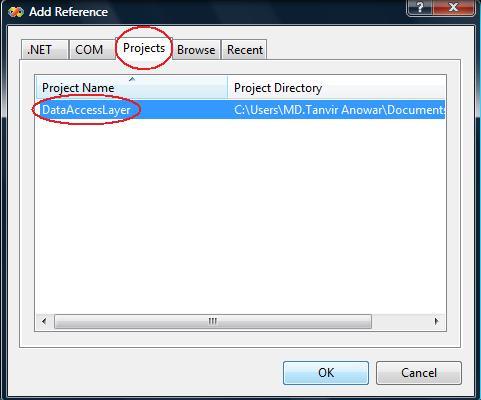
After a short time a window will came named Add Reference, from there we have to select the Project tab and let select the desired project for us its "DataAccessLayer" then click ok.

the task is done now we will be able to use the "DataAccessLayer" project's resource from our "Emp" website .

There is little additional task to do ..

We have to define the name of the project                  

"using DataAccessLayer;"  at the top of the classes which will use the resource of the "DataAccessLayer" as following.

that's all for today

Bye 

Saturday, July 12, 2008

Simple XML parsing with XPath

Hello again. Today i will talk about how to purse XML simply with .NET's XPath features.We know XML now days gets very important thing for transferring or what ever. I will show how simply we can Purse a XML file. Suppose we have a XML file named "Sample.xml" and the structure of that XML file is as bellow:
   1:  <?xml version="1.0" encoding="utf-8" ?>
   2:  <items>
   3:    <item>
   4:      <name>Tanvir</name>
   5:      <id>03-04304-3</id>
   6:    </item>
   7:    <item>
   8:      <name>Anowar</name>
   9:      <id>04-04304-2</id>
  10:    </item>
  11:  </items>
now open a Default.aspx page and import the sub class Xml,and Xml.XPath by writing as bellow:
   1:  using System.Xml;
   2:  using System.Xml.XPath;
Now making a XPathDocument document we can iterate our queries as given in nav.Select("/items/item/name") . here /items/item/name is our query ,where Items is the root node . item is the child node and name is our desired node which is going to be explored.
The following code is in C#.NET for exploring XML node with XPath.
 XPathDocument xmlDoc = new XPathDocument(MapPath("Sample.xml"));
 XPathNavigator nav = xmlDoc.CreateNavigator();
 XPathNodeIterator iterate = nav.Select("/items/item/name");
 while(iterate.MoveNext())
 { 
    Response.Write(iterate.Current.Name); // print the node name
    Response.Write("&nbsp");
    Response.Write(iterate.Current.Value); // print the value
    Response.Write("<br />"); 
  }

Simple Mail send Through .NET

Hello all ,
Today i will describe how to send mail through .NET
First we have to configure the SMTP mail server . In this context i have assumed you mail server has been configured (including web.config ).
Now we have to import

using System.Net;
using System.Net.Mail;
And through the following code we will able to send mail with attachment.
MailMessage msg = new MailMessage();
msg.From = new MailAddress("mail@test.com");
msg.To.Add(new MailAddress("mail_1@test.com"));
msg.To.Add(new MailAddress("mail_2@test.com"));
msg.CC.Add(new MailAddress("mail_3@test.com"));
msg.Bcc.Add(new MailAddress("mail_4@test.com"));
msg.Attachments.Add(new Attachment(@"c:\file.txt"));
msg.Subject = "This is a test mail";
msg.Body = "This is the body of the mail";
SmtpClient client = new SmtpClient();
client.Send(msg);

Saturday, July 5, 2008

Event fire at certain time.

(This article is taken from one of my other blog.) from few days one thing is clicking in my head very simple but not initiated before.so i have posted the problem in phpfreaks forum and got some useful solutions : #1 : hi i want to know how to run continuous service which is written in php? for example : i want to inform through email to my clients in a particular time automatically , how to do it ? Thanking you Tanvir.
=> Cron job.
# 2 : but there is one question more, if i use corn job then i must have access to modify the etc/corntab in any linux server, generally when we hosting a site then we dont have the permission to modify any server scripts like corntab unless its a dedicated server. is there any other solution to do the job avoiding this problem? =>If you don't have access to the crontab, then you most certainly won't have access to the init scripts required to run a service. => ot entirely true. On many 'shared' hosting plans that use stuff like cpanel, they will allow you to set up your own cron jobs. Fairly easily too. =>if not many people provide external crontab access so that you can have a psedo cron tab by having another server ping your cron job page. they might cost you a monthly fee, but it be better than switching hosting companies

Easy Northwind Database installation.

Its pretty much needed to work with a existing relational database to test any new features of a language,but its really tough to get it at the right moment. We can easily get one from Microsoft's Northwind database.First we have to install SQL Server Management Studio and then download the sample database form here . After installing the SampleDB, it will create a directory named "C:\SQL Server 2000 Sample Databases" . In this Database we will get some files including NORTHWND.MDF.To use it, first we have some inital tasks to do ... 1. In the first step we have to double click on "instnwnd.sql" which is in the "C:\SQL Server 2000 Sample Databases" folder , after click SQL Server Management Studio will automaticly open then we have to press the "Execute" button. 2. In the similar way we also wave to double click on "instpubs.sql" and do the same thing. after that when we connect our SQL server we foud our desired NORTHWIND database . in the above topic i have escaped many vital technical issues just to make the article simple any easy to read as well as easy to impliment. hope it will work. have a nice day.